Configuring and Testing ODBC DSN Settings
 How To Configure and Test ODBC DSN Settings?
✍: Guest
Continue from the previous tutorial. Click Next after you have finished changing the port number. The ODBC Data Source Administrator will try to connect to the SQL server through the specified port number and login information.
If the connection is successful, you will see the next screen asking for selecting default database.
1. Check "Change the default database to:" check box, and select "FyiCenterData" as the default database for this DSN setting. See picture bellow:
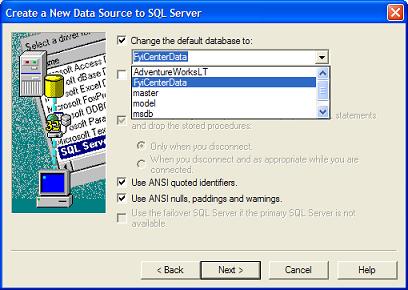
2. Click Next to see the last screen of the "Create a New Data Source to SQL Server" wizard.
3. Change nothing on the last screen and click Finish button. The confirmation screen shows up.
4. Click "Test Data Source..." button. You should see the test result as:
Attempting connection
Connection established
Verifying option settings
Disconnecting from server

TESTS COMPLETED SUCCESSFULLY!
Your FYI_SQL_SERVER ODBC DSN is ready to use.
⇒ Connecting MS Access to SQL Servers through ODBC
⇐ Configuring ODBC DSN with Different Port Numbers
2024-07-25, 2718🔥, 0💬
Related Topics:
