Connecting MS Access to SQL Servers through ODBC
 How To Connect MS Access to SQL Servers through ODBC?
✍: Guest
Once you got a DSN defined in the ODBC manager that connects to your SQL Server, you can connect a normal MS Access document to the Oracle server, and link an Access table to a SQL Server table. The tutorial below gives you a good example:
- Start MS Access with a new database file.
- Go to File menu.
- Select Get External Data.
- Select Import.... The Import dialog box shows up.
- Select Files of type: ODBC Database(). The Select Data Source dialog box shows up.
- Click the Machine Data Source tab. You should see the DSN name "FYI_SQL_SERVER" you defined earlier.
- Select "FYI_SQL_SERVER".
- Enter User Name: sa.
- Enter Password: FYIcenter.
Click the OK button to continue. You should see a list of tables available for you to import from the SQL Server as shown in the picture below:
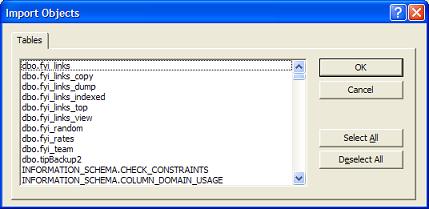
Select the table you are interested in and click OK. You should the selected table being imported from the SQL Server to MS Access.
⇒ Connecting Windows Applications to SQL Servers via ODBC
⇐ Configuring and Testing ODBC DSN Settings
2024-03-17, 2643🔥, 0💬
Related Topics:
