Show Installed Oracle ODBC Drivers in Oracle
Q
How To Find Out What Oracle ODBC Drivers Are Installed in Oracle?
✍: FYIcenter.com
A

To find out what Oracle ODBC drivers are installed on your Windows system, you can use the ODBC manager to look at them:
- Go to Control Panel.
- Go to Administrative Tools.
- Run Data Sources (ODBC).
- Go to System DSN tab.
- Click the Add button.
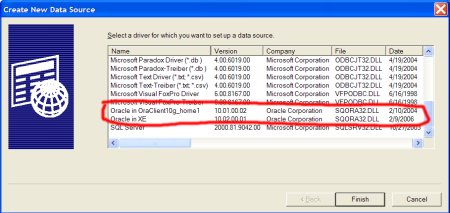
You should a list of all ODBC drivers installed on your system. Oracle ODBC drivers should
be on the list. For example, your installed ODBC driver list could look like the one the
picture bellow with two Oracle ODBC drivers, "Oracle in OraClient10g_home1" and "Oracle in XE":
⇒ Windows Applications Connect to Oracle Servers in Oracle
⇐ Install Oracle ODBC Drivers in Oracle
2016-10-15, 3021🔥, 0💬
Related Topics:
