Running Queries with SQL Server Management Studio Express in SQL Server
How to run Queries with SQL Server Management Studio Express in SQL Server?
✍: FYIcenter.com

1. Launch and connect SQL Server Management Studio Express to the local SQL Server 2005 Express.
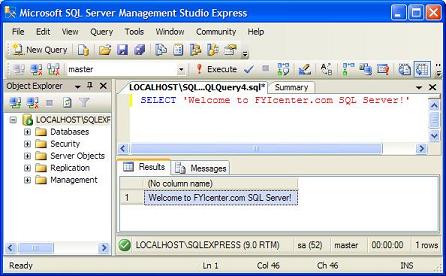
2. Click on the "New Query" button below the menu line. Enter the following SQL statement in the query window:
SELECT 'Welcome to FYIcenter.com SQL Server!'
3. Click the Execute button in the toolbar area. You should get the following in the result window:
Welcome to FYIcenter.com SQL Server!
See the following picture to know where the query and result windows are:
⇒ Running Queries with 'sqlcmd' Tool in SQL Server
⇐ Connecting SQL Server Management Studio Express To a SQL Server in SQL Server
⇑ Downloading and Installing SQL Server 2005 Express Edition
2016-12-04, 5506🔥, 0💬
Related Topics:
